Minecraft color codes (also called formatting codes) let you add colored and styled text to names, chat messages, server MOTDs, and world titles. These codes work across Java Edition and Bedrock Edition, on servers running Bukkit plugins like Essentials, and in single-player worlds.
Text in Minecraft can be formatted with the section sign (§). In Bedrock Edition, you can enter the section sign directly into signs, world names, books, item renaming, and chat. In Java Edition, section signs work in server.properties, pack.mcmeta, world titles, books, and server names. External tools like NBTExplorer can insert them in other locations.
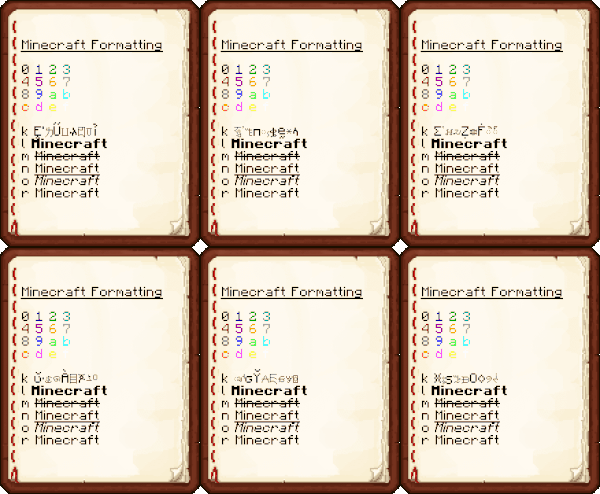
How Formatting Codes Work
Formatting codes use a section sign (§) followed by a hex digit. On servers with Essentials, the ampersand (&) can replace the section sign. The & format is an Essentials plugin permission that many servers enable by default.
In Java Edition, the color code must be used before the formatting code. The formatting code value resets after a color code. For example, &cA&li appears as Ai, but &lA&ci appears as Ai. Always place the color code first and reapply the formatting code when switching colors.
In Bedrock Edition, formatting codes persist after a color code. If an obfuscated code is used without a reset before the end of the line, the client GUI continues obfuscating text past the MOTD and into the version number display.
Complete Color Code Reference
Minecraft supports 16 standard colors plus minecoin gold (Bedrock only). Each code uses a single character from 0-9 and a-f. The table below lists every color code with its RGB values and hex equivalent.
| Code | Name | R | G | B | Color | Hex | BE/JE |
| &0 | black | 0 | 0 | 0 | HI | #000000 | |
| &1 | dark_blue | 0 | 0 | 170 | HI | #0000AA | |
| &2 | dark_green | 0 | 170 | 0 | HI | #00AA00 | |
| &3 | dark_aqua | 0 | 170 | 170 | HI | #00AAAA | |
| &4 | dark_red | 170 | 0 | 0 | HI | #AA0000 | |
| &5 | dark_purple | 170 | 0 | 170 | HI | #AA00AA | |
| &6 | gold | 255 | 170 | 0 | HI | #FFAA00 | |
| &7 | gray | 170 | 170 | 170 | HI | #AAAAAA | |
| &8 | dark_gray | 85 | 85 | 85 | HI | #555555 | |
| &9 | blue | 85 | 85 | 255 | HI | #5555FF | |
| &a | green | 85 | 255 | 85 | HI | #55FF55 | |
| &b | aqua | 85 | 255 | 255 | HI | #55FFFF | |
| &c | red | 255 | 85 | 85 | HI | #FF5555 | |
| &d | light_purple | 255 | 85 | 255 | HI | #FF55FF | |
| &e | yellow | 255 | 255 | 85 | HI | #FFFF55 | |
| &f | white | 255 | 255 | 255 | HI | #FFFFFF | |
| &g | minecoin_gold | 221 | 214 | 5 | HI | #DDD605 | [BE only] |
Formatting Code Reference
Minecraft includes six formatting codes for text effects: obfuscated, bold, strikethrough, underline, italic, and reset. Not all codes work on both editions.
| Code | Name | Bedrock | Java |
| &k | obfuscated | Yes | Yes |
| &l | bold | Yes | Yes |
| &m | No | Yes | |
| &n | underline | No | Yes |
| &o | italic | Yes | Yes |
| &r | reset | Yes | Yes |
Words using the obfuscated code (&k) keep the same character width as the original text. The reset code (&r) clears all active formatting but retains the color. For example, &c&oHel&rlo displays as Hello.
Using Color Codes in server.properties and pack.mcmeta
For MOTD colors in server.properties, use \u00A7 instead of §. For example, §5 becomes \u00A75. Colors and formatting work together – always place formatting codes after the color code.
In pack.mcmeta files, the description field accepts raw JSON text. You can replace § codes with JSON text components that use different colors and styles, though the old section sign method still works.
If your MOTD displays question marks, the server may have replaced § with § (\u00C2\u00A7). Delete the extra \u00C2 character to fix the display.
| Code | Official Name | MOTD code | Note |
| §0 | Black | \u00A70 | |
| §1 | Dark Blue | \u00A71 | |
| §2 | Dark Green | \u00A72 | |
| §3 | Dark Aqua | \u00A73 | |
| §4 | Dark Red | \u00A74 | |
| §5 | Dark Purple | \u00A75 | |
| §6 | Gold | \u00A76 | |
| §7 | Gray | \u00A77 | |
| §8 | Dark Gray | \u00A78 | |
| §9 | Blue | \u00A79 | |
| §a | Green | \u00A7a | |
| §b | Aqua | \u00A7b | |
| §c | Red | \u00A7c | |
| §d | Light Purple | \u00A7d | |
| §e | Yellow | \u00A7e | |
| §f | White | \u00A7f | |
| §k | Obfuscated | \u00A7k | |
| §l | Bold | \u00A7l | |
| §m | \u00A7m | Java Only | |
| §n | Underline | \u00A7n | Java Only |
| §o | Italic | \u00A7o | |
| §r | Reset | \u00A7r |
Using Color Codes in World Names
With external tools like NBTExplorer, you can add color codes to world names. Open the LevelName tag in the world’s level.dat file and paste your formatted text. For example, setting LevelName to §1R§2e§3d§4s§5t§6o§7n§8e §9C§ar§be§ca§dt§ei§fo§1n§2s creates a rainbow world name.
In Bedrock Edition, you can use the § symbol directly in the world name when creating a new world. No external tools are needed – just type the section sign and your color code into the name field.
Sample Text Examples

§nMinecraft Formatting§r

§00 §11 §22 §33
§44 §55 §66 §77
§88 §99 §aa §bb
§cc §dd §ee §ff

§rk §kMinecraft
§rl §lMinecraft
§rm §mMinecraft
§rn §nMinecraft
§ro §oMinecraft
§rr §rMinecraft
More Minecraft Guides
Color codes are just one way to customize your Minecraft experience. Check out our guide to the 10 best potions of Minecraft for useful brewing recipes. If you are building a base, the 5 best Minecraft enchantments for armor will keep you protected.
For combat-focused players, our guide to the best Minecraft enchantments for swords covers every weapon upgrade. And if you are starting fresh, the best helmet enchantments in Minecraft help you survive those first nights.