

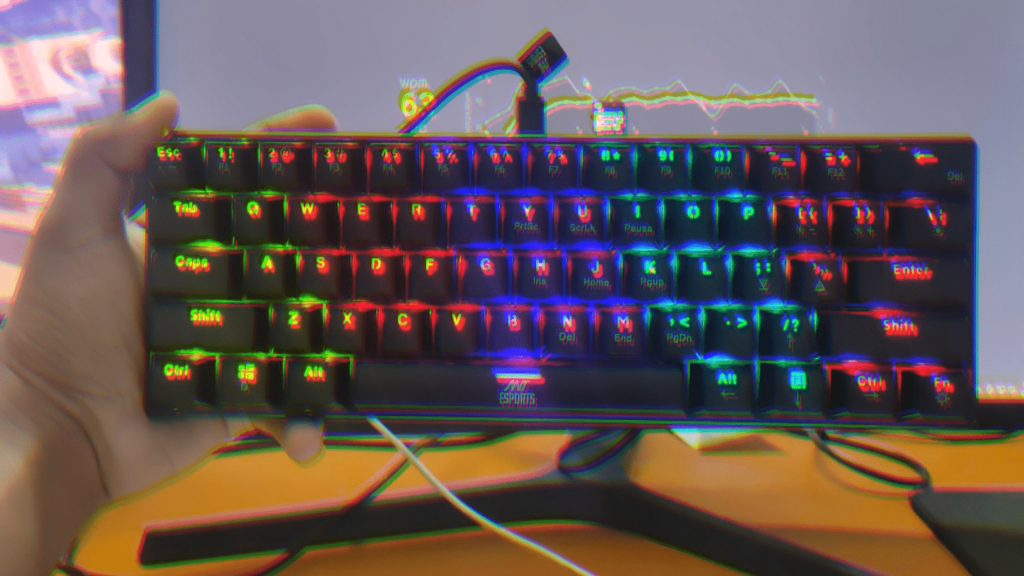
Mechanical keyboards used to be an expensive niche. But brands like AntEsports have changed that completely. If you are looking for an affordable 60% keyboard in India, the AntEsports MK1200 Mini is one of the cheapest options you will find.
Priced at just Rs. 2050, this keyboard brings genuine mechanical switches, RGB lighting, and a compact form factor to budget-conscious buyers. We have been using it as our daily driver for months and here is our honest review.
Specifications
Type: 61-key QWERTY layout
Form factor: 60%
Material: Plastic body
Software: None (plug and play)
Macros: Fixed macros, non-customizable
Illumination: 17 backlit modes with 4 brightness levels
Switch type: YH Blue (clicky, Cherry MX compatible stem)
Keycaps: ABS
Connectivity: Detachable Type-C cable (braided, included)
Price: Rs. 2050
Build Quality and Design
The AntEsports MK1200 Mini features a compact 60% layout that frees up plenty of desk space. The all-plastic build feels sturdy for its price point and weighs very little, making it easy to carry around.
It uses standard ABS keycaps with laser-etched legends. While ABS keycaps are basic, they are completely serviceable at this price. You can always upgrade to PBT keycaps later if you want a premium feel.
The keyboard comes with a detachable braided Type-C cable, which is a welcome feature at this budget. The cable is roughly 1.5 meters long and works well for both desktop and laptop setups.
Switches and Typing Experience
The MK1200 Mini uses YH Blue switches, which are clicky and tactile. They feel very similar to Outemu Blue switches found on other budget mechanical keyboards. Each key has a rated lifespan of 50 million keystrokes.
Typing on this keyboard is satisfying. The clicky feedback gives you clear confirmation on every press. The sound is audible but not overly loud compared to Cherry MX Blue switches. Gaming performance is solid too, with full anti-ghosting support across all keys.
If you are new to 60% keyboards, the learning curve is minimal. Arrow keys are accessed via FN + Alt (left), FN + Question mark (up), FN + Menu key (down), and FN + Ctrl (right). Function keys require FN + Shift + the F-key.
RGB Lighting
The MK1200 Mini includes 17 preset RGB backlight modes. You can cycle through them using the function keys and adjust brightness across four levels. The lighting is bright and evenly distributed despite the ABS keycaps.
Note that the RGB effects are not customizable through software. You are limited to the preset modes, which range from static colors to wave, breathing, and reactive patterns. For most users, these presets offer enough variety.
What We Like
The biggest strength of this keyboard is its value. You get a genuine mechanical switch experience for under Rs. 2500, which is remarkable. The detachable Type-C cable is a premium touch at this price.
The compact 60% design saves desk space and looks clean in any setup. Build quality is better than expected for the price. Full anti-ghosting makes it suitable for gaming without issues.
If you are building a budget gaming PC, pairing this keyboard with a good mouse completes the setup. Check out our guide to choosing an ideal gaming mouse for recommendations.
What Could Be Better
The keyboard lacks height-adjustable feet, which would have been nice for ergonomics. There is also no keycap puller included in the box, so you will need to buy one separately if you plan to swap keycaps.
The ABS keycaps develop shine over time with heavy use. The fixed macro layout cannot be reprogrammed. And the lack of software means no custom key mapping or RGB customization.
Verdict
The AntEsports MK1200 Mini is an excellent entry-level 60% mechanical keyboard. If you are on a tight budget and want to switch from membrane to mechanical, this is one of the best options available in India.
It delivers on the essentials: genuine mechanical switches, decent build, RGB lighting, and a compact form factor. The few compromises (ABS keycaps, no adjuster feet, no software) are forgivable at this price.
For comparison, you can also check our reviews of the HyperX Alloy Core RGB, Corsair K60 RGB Pro, and HyperX Alloy Origins Core for higher-budget alternatives.
Frequently Asked Questions
Is the AntEsports MK1200 Mini hot-swappable?
No, the switches are soldered to the PCB. You cannot swap them without desoldering.
Does it work with Mac?
Yes, it works as a standard USB keyboard on macOS. The media keys may not map directly.
Can I customize the RGB lighting?
Only through the 17 preset modes using the function keys. There is no software support for custom colors or patterns.
Does it have NKRO?
It supports 26-key rollover (full anti-ghosting), which is sufficient for most gaming scenarios.