

The most popular Facebook data transfer tool rolls out for every user out there. The service was launched in some regions of the world for testing but now is out worldwide.
People have been requesting for a while now from Facebook to allow the transfer of photos directly onto their Google Photos. This Facebook data transfer tool was launched in December 2019 in Ireland, then Africa in March 2020. It was launched for the US in march 2020 and is finally rolling out for everyone worldwide. Earlier, if you needed to deactivate your Facebook account, you needed to download your favorite photos and videos. This can be a lot of burden for some people but there’s a shortcut available now.
The Facebook data transfer tool is fairly simple to use and can be of a lot of help for people who don’t want to sweep their old photos in order to take a backup of their snaps. According to the blog by Facebook, they were working on some data portability tools to help the users transfer any data seamlessly throughout Facebook or outside of the service. The tool was in testing mode since march when it was launched in Ireland and looks like the app is finally ready.
According to the twitter handle of Alexandru Voica, the feature is now 100% rollout and is available for every Facebook user there is.
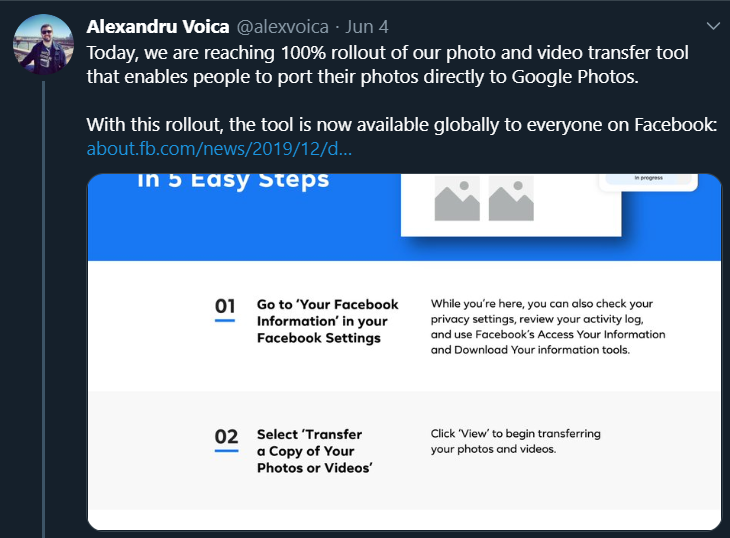
How to transfer photos via Facebook Data Transfer Tool
- Go to Settings in Facebook
- Locate Your Facebook Information
- Choose Transfer a copy of your Photos and Videos
- It will ask to re-enter your Facebook password for security reasons
- A page will pop up for you to select on Google Photos
- Log in with the Google Credentials where you need to transfer your data
Yeah, that’s it! Facebook data transfer tool is not only simple but with the most basic functions so that everyone can access the service without any issues.
This tool is a step towards the Data Transfer Project (DTP) between the four tech giants Google, Microsoft, Facebook, and Twitter. The DTP project will allow users to download and transfer data between multiple platforms.
For now, Facebook has given the option to transfer in Google Photos and we might see other services and options for the users to choose from. Stay tuned to get our updates to regular news like this.