

In the era of oversized GPUs and massive PC cases, the Thermaltake Tower 100 stands as a refreshing nod to compact computing. This mini ITX cabinet takes the iconic design of the larger Thermaltake Tower 900 and shrinks it down without sacrificing style. If you are looking for a small form factor case that makes a visual statement, the Tower 100 deserves your attention in 2026.
The Tower 100 is a vertical mini ITX case designed to show off your components through panoramic tempered glass panels. It combines the charm of a display cabinet with the practicality of a functional PC case. Let us take a detailed look at what this case offers and whether it holds up in the current market.
Design and Build Quality
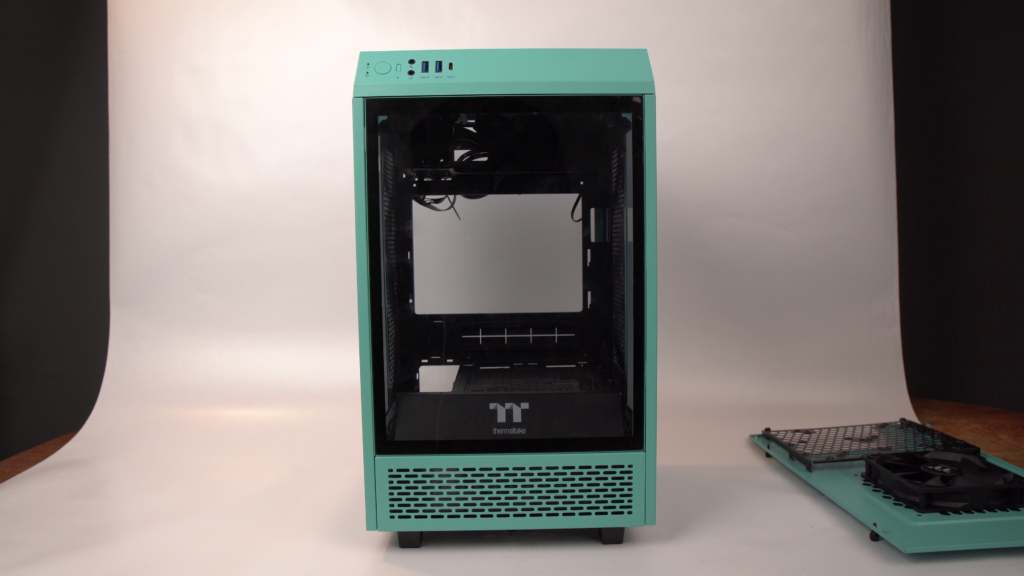
The Thermaltake Tower 100 stands about 18 inches tall and occupies a surprisingly small footprint on your desk. The panoramic glass panels give you a full view of your components, making it an excellent choice for builders who invest in RGB lighting and custom cable management.
Build quality is solid for the price point. While there is some plastic used in non-structural areas, it blends well with the overall design. The perforated steel panels ensure adequate airflow, which is impressive given the compact size. Small cases and good airflow rarely go hand in hand, but the Tower 100 manages both reasonably well.
All intake locations come with dust filters, including the top, rear exhaust, and PSU intake. This is a welcome feature that keeps dust buildup under control. The Racing Green color option remains one of the most popular choices, adding a premium feel to the overall aesthetic.
Ports and I/O
The front I/O panel includes two USB 3.0 ports, one USB Type-C port, headphone and microphone jacks, and power and reset buttons. This layout is identical to its larger sibling, the Tower 900. The inclusion of USB-C in 2022 was forward-looking, and it remains a welcome feature in 2026 as more peripherals adopt the standard.
Internal Layout and Component Support
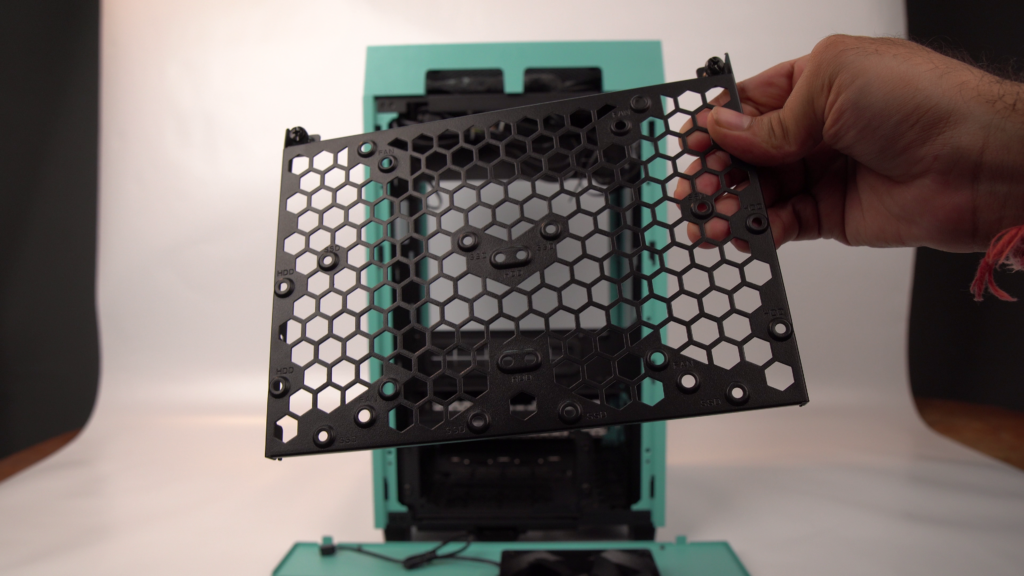
Opening the Tower 100 requires removing several thumb screws. The glass panels come off easily, and after pulling out the dust filters, you have full access to the chassis. The internal layout mirrors the Tower 900 in a more compact form.
You can install a 120mm or 140mm fan at the bottom, where a shroud with vents sits. The bottom area can also accommodate 2.5-inch drive bays. An ATX power supply fits without issues, though cable routing requires some planning due to the tight space. The included cables are all black sleeved, and the flat USB-C cable makes routing simpler.
The drive bay supports up to 3.5-inch hard drives, or you can install an additional fan depending on your needs. There is enough clearance for most modern GPUs, and the case can still fit two 2.5-inch drives alongside. A 120mm fan at the rear handles exhaust, while another 120mm fan on the top pushes hot air out. Some builders prefer upgrading to a 140mm top fan or a 140mm AIO cooler for improved thermal performance.
If you are building a PC for the first time, you might also want to read our guide on how to solve the CPU fan error which covers common POST issues during initial setup.
Cooling Performance
Given its size, the Tower 100 performs admirably in thermal testing. The perforated steel panels and dual 120mm fans create adequate airflow through the chassis. However, the case is not the quietest option available. The compact dimensions naturally amplify fan noise compared to larger cases with better acoustic dampening.
For most mid-range builds, the stock cooling setup is sufficient. If you plan to run high-end components that generate significant heat, consider replacing the stock fans with higher-performance units or adding a 140mm AIO on the top. Note that there is no official support for custom liquid cooling loops, so plan your build accordingly.
Pros and Cons
Pros:
– Stunning panoramic glass design with excellent visual appeal
– Good build quality with dust filters at all intake points
– Supports ATX power supplies despite the compact size
– USB-C front I/O port is future-proof
– Small footprint saves desk space
Cons:
– Cable management is challenging due to limited space
– No official support for liquid cooling radiators beyond 140mm AIO
– Stock fans could be quieter
– Opening the case requires removing multiple screws
– Limited airflow for very high-end components
Verdict
The Thermaltake Tower 100 is a stylish mini ITX case that prioritizes aesthetics without completely ignoring functionality. It is best suited for builders who want a visually striking desktop setup and do not plan to run extremely power-hungry components. The aquarium-like glass panels look fantastic when paired with RGB lighting.
In 2026, the Tower 100 remains a solid choice in the mini ITX segment. While it requires patience with cable management and may need fan upgrades for optimal cooling, the overall package delivers good value. If you are curious about other PC hardware reviews, check out our GTX 1660 Super review for a GPU that pairs well with this case.
At a price range of approximately 7000 to 8000 Indian Rupees (or equivalent in local markets), the Tower 100 competes well with other mini ITX offerings. If you need something more spacious, consider looking at larger form factor cases, but for a compact showpiece build, this Thermaltake case is hard to beat.
Frequently Asked Questions
Is the Thermaltake Tower 100 worth buying in 2026?
Yes, if you want a visually striking mini ITX case for a mid-range build. The design is timeless and the build quality holds up well against newer competitors. Just be prepared for some cable management challenges.
Can the Tower 100 fit a full-size GPU?
Yes, the case supports most modern GPUs up to standard lengths. The vertical orientation provides enough clearance for dual-slot and some triple-slot cards.
Does the Tower 100 come with fans?
Yes, it includes one 120mm rear fan and one 120mm top fan. You can add more fans or replace the stock ones for better performance. Check out the Gamdias Chione M2 240R review if you are considering a liquid cooling upgrade.
What power supply does the Tower 100 support?
It supports standard ATX power supplies. The bottom-mounted PSU bay has dust filters and enough clearance for most units. Cable management requires some effort due to the compact layout, similar to what you would face in other small form factor cases.