
Streaming is a big thing nowadays, it started from gaming and has now expanded things like cooking, carpentry, painting, etc. Whatever you can imagine, there is a person who streams that content on the internet. It is now one of the best ways for content creators to engage people and expand their brands.
The most important aspect of a good stream is the software you use and today we will test 2 software head to head and find out which one is better. This is Streamlabs vs OBS, compared.
OBS Studio
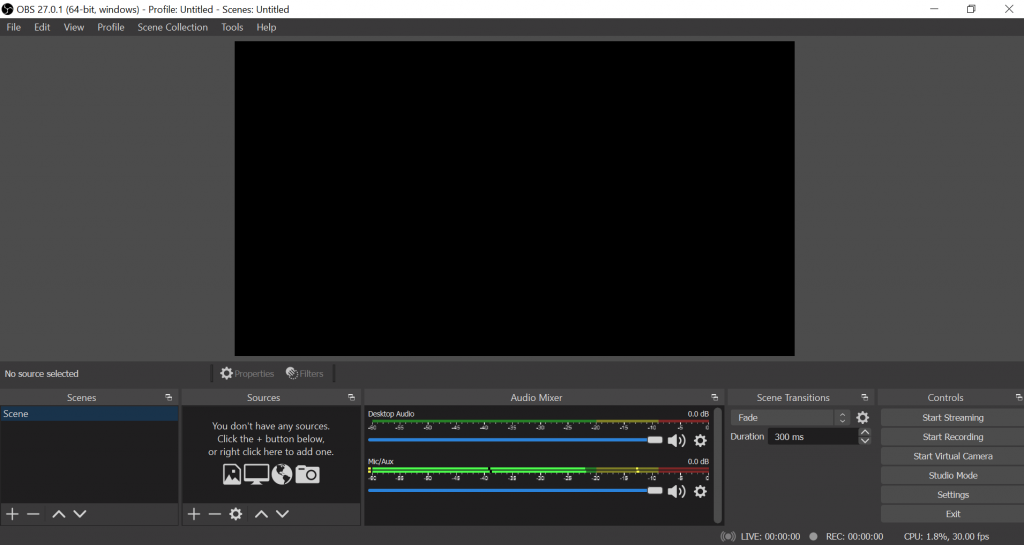
Everyone who streams content on the Internet knows about OBS Studio. It is one of the most used and best broadcasting software in the market today. It is free and open-source with a very active online community which makes it the first choice for beginners.
Streamlabs
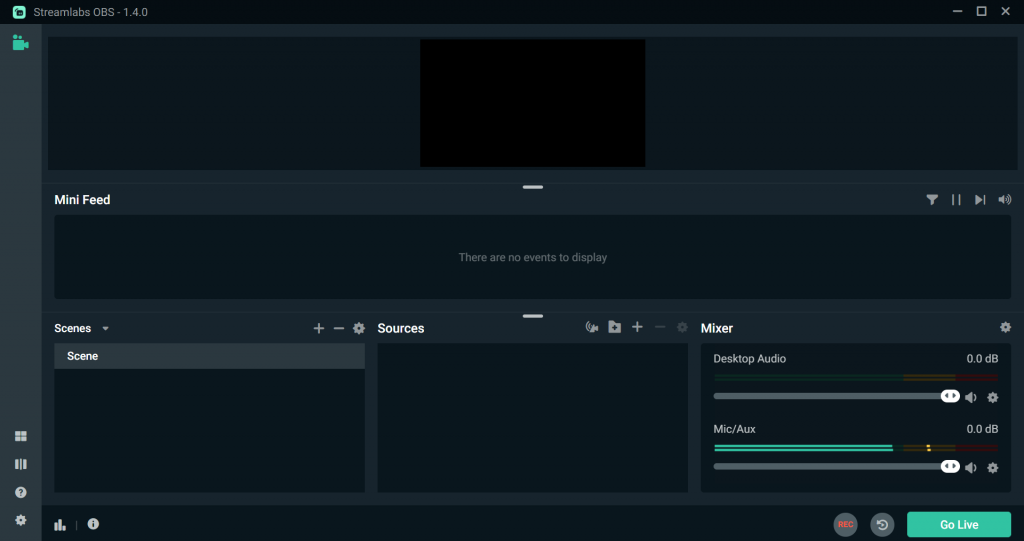
Streamlabs can be thought of as an improved version of OBS. The small things which made OBS slightly less appealing were taken care of but underneath it’s almost the same. While the OBS is completely free, Streamlabs comes in a free and a paid version.
- Advertisement -
Streamlabs vs OBS
Resource Usage
Being a less resource-consuming software has been a USP of OBS and has continued to put it ahead of the competition, but sometimes that results in stuttering of frames while recording.
StreamLabs OBS is visually more appealing and requires more resources.
Support for different OS
OBS Studio is available across Windows Mac and Linux.
Streamlabs OBS is available for Windows and is in the beta stage for Macintosh. It is also available on mobile.
Updates
Streamlabs OBS is basically a revamped version of OBS and uses slightly modified code of the same. This means that the Streamlabs users receive the updates long after they come for OBS.
Ease of Use
Both Streamlabs and OBS are fairly easy to set up.
Streamlabs provides you all the tools you need to set up your stream quickly. The integration with Twitch and YouTube and features like chatbot make setting up of the stream a cakewalk. If at some point do not understand something and get stuck, there are a plethora of tutorials available.
- Advertisement -
OBS Studio on the other hand is also easy to set up but the learning curve happens to be long and tiresome. The user has to download and configure third-party plugins which also takes time. Setting up OBS is easy but making any changes is not.
Flexibility
Being free and open-source allows OBS to have a list of plugins that is nearly limitless. This means that the user has full control over their stream and can make it truly their own.
OBS is for everybody, whether you stream Games or anything else. Whatever customization you want, there might be a plugin for that.
The key demographic for Streamlabs are gamers and it provides a lot of tools for them.
Also, the features that can only be accessed with the paid version are available for free in the OBS studio
Overlays
Overlays play a huge role in your stream and sometimes attract and engage people.
Streamlabs comes with a set of layouts that can be set up quickly while OBS studio does not have any default overlays but you can download or create your own
- Advertisement -
StreamLabs: Pros
Chat
Built-in chat eliminates the need to keep multiple browser tabs open. StreamLabs OBS has the option to look after the chat inside the program. Important tools like chatbot are also provided along with Mod tools
Overlays
As talked about above in the article Streamlabs OBS comes with a default set of overlays that are both static animated and allow the user to customize their stream.
Testing with just a click
Streamlabs OBS allows the users to check if everything is working properly with just a click of a button. The test widget often comes in handy and saves the user from any error that may have occurred during the stream.
Undo shortcut
The user can easily undo the changes they have made with the ‘Ctrl + Z‘ shortcut which saves a lot of time during editing.
Text-to-Speech engine built-in
Text to speech is used by almost everyone these days. They read out the messages sent by the viewers when donating any amount of money to the streamer.
Phone control
Want to make some quick last-minute adjustments? far away from your PC? Streamlabs OBS allows the user to make changes to their stream through their phone.
Multistreaming Capabilites
Multistreaming allows the user to broadcast their stream on multiple platforms. This ultimately improves their engagement. Streamlabs OBS allows the user to multi-stream but the feature is only available in the paid version.
App Store
Streamlabs OBS has an inbuilt app store that helps in improving the functionality of the software and makes it easier to access and implement the changes that would be difficult to do in OBS. This feature is only available in the paid version.
StreamLabs: Cons
Resource Usage
All of the added functionality in the Streamlabs OBS means that it will consume more resources than OBS which will make it difficult to run on an older PC.
Lack of Sound Commands
The in-built chatbot does not have the sound commands for the chat. If you want them you would have to run chatbot separately from Streamlabs OBS.
Plugin Support
Unlike OBS, Streamlabs OBS is not an open-source software that limits the number of plugins available and overall decreases the room for customization that is available.
Only available on Windows
Streamlabs OBS is only available for windows which makes the users of Mac forced to look somewhere else.
Open Source Code
The code is open source that means that the developers can develop plugins according to their needs and since the code is accessible by everyone bugs and glitches are eliminated rapidly.
Interface
The interface can be completely re-arranged. The drag and drop feature makes the task of customizing the stream very easy and different settings help the user to make the stream truly their own.
Low Resource Usage
UBS is one of the lightest streaming software in the market today which allows it to run older PCs. A low CPU usage also means a smoother stream.
Faster updates among the two
OBS is now a household name which means that it is the first one to receive any type of updates like a new GPU encoder or a driver. Since streamlabs is a customized version of OBS the users of the former have to wait longer for updates.
Multi Platform support
OBS allows streaming to multiple platforms like Twitch, YouTube, and Facebook which allows the streamers to expand themselves and attract and engage new audiences.
Default Configurations for different platforms
OBS has pre-configured settings that are suited for different platforms which saves a lot of time and hassle on the streamer’s end.
OBS: Cons
Dated UI
The dated User Interface makes the learning curve longer than Streamlabs OBS which might overwhelm and drive away beginners.
Can’t play audio files as sources
As the title says the user cannot play any audio file on this stream from their computer.
Conclusion
There you have it, this is everything you need to know about Streamlabs vs OBS to make you make the right choice.
Both of the softwares are great in their own right and are free, so anyone can download and check them out. Both perform very well do exactly what they say and will not disappoint you. While Streamlabs OBS is geared especially towards Gamers, OBS Studio is for everyone. And while you can access the full functionality of OBS Studio for free you have to pay a premium to unlock the full potential of Streamlabs OBS.
Downloads –
Also read : OBS vs XSplit : Which is the best streaming software